User Guide Contents
Coding Intelligence
Automatic billing code suggestions — derived from your clinical documentation and ready the moment a note is finished.
Accessing billing codes
Billing codes appear in the top right of the note editor once a visit is complete. Click "Billing Codes" to open a modal with the full details.
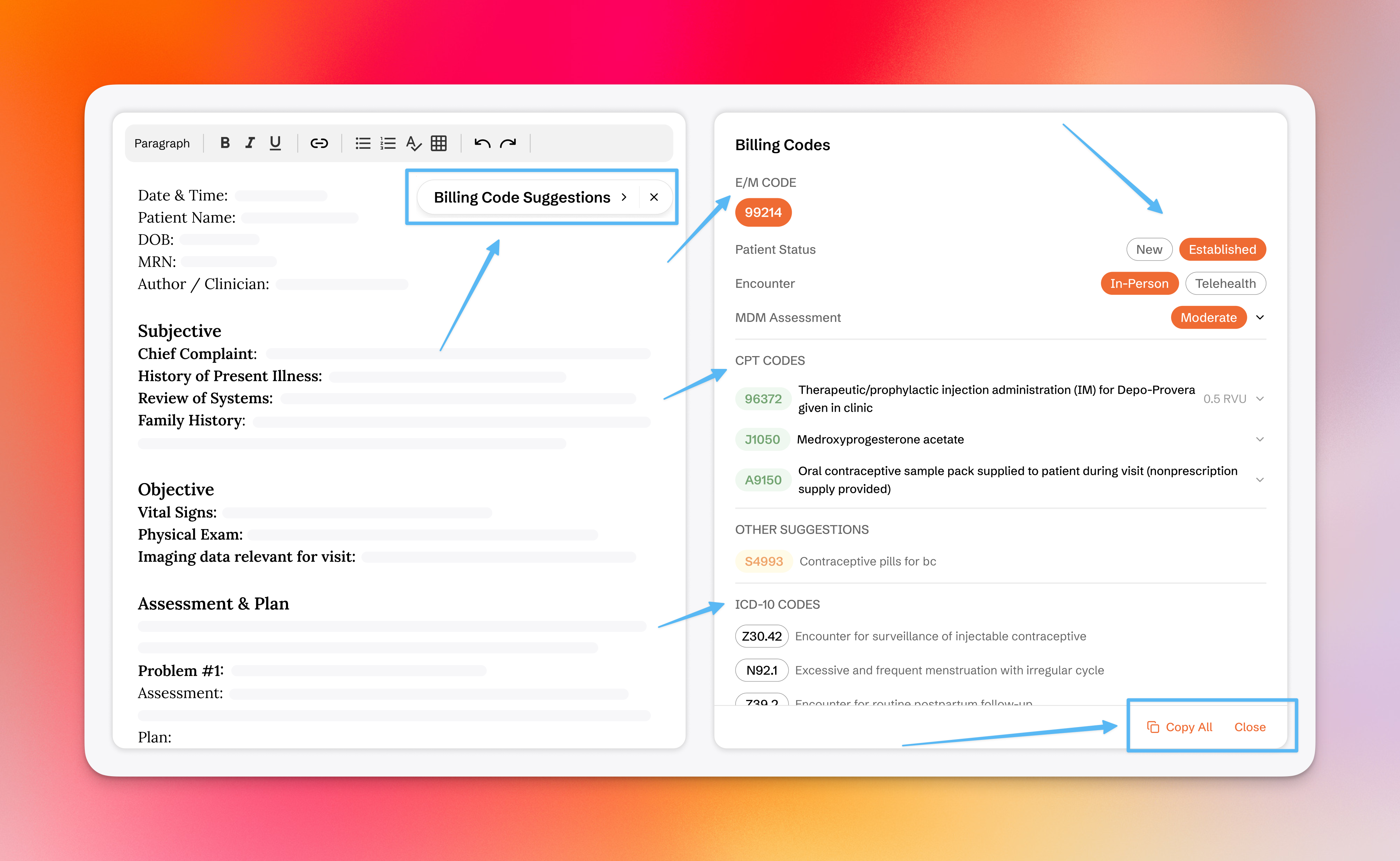
You can configure the visibility of billing codes in the visits editor header by clicking Show/Hide Codes.
What Coding Intelligence provides
Coding Intelligence is applied automatically at the end of every visit and delivers:
- Automatic CPT code sequencing to maximize reimbursement.
- E/M level recommendations with supporting MDM rationale
- ICD-10 diagnosis codes — all derived from clinical documentation
E/M level recommendations
Medical decision-making documentation is one of the most time-consuming parts of medical practice — for every hour of patient care, physicians spend nearly two additional hours on documentation.
OpenEvidence generates the full MDM breakdown automatically from the clinical note. Whether billing by complexity or by time, the reasoning is already documented and included in the record.
CPT code suggestions
Suggestions reflect what was said and done during the visit — including uncommon procedure codes that are easily missed in complex cases. The wrong code billed out of habit quietly compounds into significant lost revenue. Coding Intelligence ensures the right code gets submitted.
CPT code sequencing
Under Medicare's Multiple Procedure Payment Reduction policy, every procedure after the first reimburses at roughly 50%. The order codes are listed in determines how much the practice gets reimbursed.
OpenEvidence shows expected RVU values alongside each CPT suggestion so codes can be sequenced correctly before the claim goes out — exactly the way an experienced biller would.
ICD-10 codes
ICD-10 diagnosis suggestions are surfaced automatically — no manual lookup, no searching for the most specific code at the end of a full clinic day. The suggestions reflect the actual nuance of what was documented.